Wednesday, September 29, 2010

Listed below are some of the frequently used ABAP Programs in SAP BI (NW 2004).

Listed below are some of the frequently used ABAP Programs in SAP BI (NW 2004).
Program name

RSCDS_NULLELIM
Delete fact table rows where all Key Figure values are zero. See Note 619826.
RSDG_CUBE_ACTIVATE
Activation of InfoCubes
RSDG_CUBE_COPY
Make InfoCube Copies
RSDG_CUBE_DELETE
Delete InfoCubes
RSDG_DODS_REPAIR
Activation of all ODS Objects with Navigation Attributes
RSDG_ODSO_ACTIVATE
Activation of all ODS Objects
RSDG_IOBJ_ACTIVATE
Activation of all InfoObjects
RSDG_IOBJ_DELETE
Deletion of InfoObjects
RSDG_IOBJ_REORG
Repair InfoObjects
RSDG_IOBJ_REORG_TEXTS
Reorganization of Texts for InfoObjects
RSDG_MPRO_ACTIVATE
Activating Multiproviders
RSDG_MPRO_COPY
Make Multiprovider Copies
RSDG_MPRO_DELETE
Deleting Multiproviders
RS_COMSTRU_ACTIVATE_ALL
Activate all inactive Communication Structures
RS_TRANSTRU_ACTIVATE_ALL
Activate Transfer Structure
RSAU_UPDR_REACTIVATE_ALL
Activate Update Rules
RRHI_HIERARCHY_ACTIVATE
Activate Hierarchies
SAP_AGGREGATES_ACTIVATE_FILL
Activating and Filling the Aggregates of an InfoCube
SAP_AGGREGATES_DEACTIVATE
Deactivating the Aggregates of an InfoCube
RS_PERS_ACTIVATE
Activating Personalization in Bex(Inactive are highlighted)
RSSM_SET_REPAIR_FULL_FLAG
Convert Full Requests to Repair Full Requests
SAP_INFOCUBE_DESIGNS
Print a List of Cubes in The System and Their Layouts
SAP_ANALYZE_ALL_INFOCUBES
Create DB Statstics for all InfoCubes
SAP_CREATE_E_FACTTABLES
Create Missing E-Fact Tables for InfoCubes and Aggregates
SAP_DROP_EMPTY_FPARTITIONS
Locate/Remove Unused or Empty partitions of F-Fact Table
SAP_DROP_TMPTABLES
Remove Temperory Database Objects
SAP_RSADMIN_MAINTAIN
Add, change, delete RSADMIN table entries
CUBE_SAMPLE_CREATE
A fast way to put some "sample" records in a InfoCube. No need to use Flatfiles,
just enter the value in a ALV-Grid or let fill the Cube with random value.
SAP_CONVERT_NORMAL_TRANS
Convert BasisCube to Transactional Cube and the opposite way around.
Listed below are some of the frequently used Function Modules within BW.
Function Module
Description (Function Group RRMX)
RRMX_WORKBOOK_DELETE
Delete BW Workbooks permanently from Roles & Favourites
RRMX_WORKBOOK_LIST_GET
Get list of all Workbooks
RRMX_WORKBOOK_QUERIES_GET
Get list of queries in a workbook
RRMX_QUERY_WHERE_USED_GET
Lists where a query has been used 
RRMX_JUMP_TARGET_GET
Get list of all Jump Targets
RRMX_JUMP_TARGET_DELETE
Delete Jump Targets

Function Module
Description
MONI_TIME_CONVERT
Used for Time Conversions.
CONVERT_TO_LOCAL_CURRENCY
Convert Foreign Currency to Local Currecny.
CONVERT_TO_FOREIGN_CURRENCY
Convert Local Currency to Foreign Currency.
TERM_TRANSLATE_TO_UPPER_CASE
Used to convert all texts to UPPERCASE
UNIT_CONVERSION_SIMPLE
Used to convert any unit to another unit. (Ref. table : T006)
TZ_GLOBAL_TO_LOCAL
Used to convert timestamp to local time
FISCPER_FROM_CALMONTH_CALC
Convert 0CALMONTH or 0CALDAY to Financial Year or Period
RSAX_BIW_GET_DATA_SIMPLE
Generic Extraction via Function Module
RSAU_READ_MASTER_DATA
Used in Data Transformations to read master data InfoObjects
RSDRI_INFOPROV_READ
RSDRI_INFOPROV_READ_DEMO 
RSDRI_INFOPROV_READ_RFC
Used to read Infocube or ODS data through RFC
DATE_COMPUTE_DAY 
DATE_TO_DAY
Returns a number what day of the week the date falls on.
DATE_GET_WEEK
Will return a week that the day is in.
RP_CALC_DATE_IN_INTERVAL
Add/Subtract Years/Months/Days from a Date.
RP_LAST_DAY_OF_THE_MONTHS 
SLS_MISC_GET_LAST_DAY_OF_MONTH
Determine Last Day of the Month.
RSARCH_DATE_CONVERT
Used for Date Converstions. We can use in Info Package routines.
RSPC_PROCESS_FINISH   
To trigger an event in process chain
 DATE_CONVERT_TO_FACTORYDATE
Returns factory calendar date for a date
 CONVERSION_EXIT_PDATE_OUTPUT
Conversion Exit for Domain GBDAT: YYYYMMDD  -> DD/MM/YYYY
 CONVERSION_EXIT_ALPHA_INPUT
Conversion exit ALPHA, external->internal
CONVERSION_EXIT_ALPHA_OUTPUT
Conversion exit ALPHA, internal->external
 RSPC_PROCESS_FINISH
Finish a process (of a process chain)
RSAOS_METADATA_UPLOAD
Upload of meta data from R/3
RSDMD_DEL_MASTER_DATA
Deletion of master data
RSPC_CHAIN_ACTIVATE_REMOTE
To activate a process chain after transport
                        
USEFUL ABAP-CLASS in NW 7 - BI to fix problems with Transformation
Class CL_RSTRAN_STAT
Description
DELETE_VERSION_FROM_DB (Static Method)
For deleting a transformations rule version from database, helpful if the transformation metadata are corrupted.

Business Objects and SAP -blogs

BusinessObjects and SAP Part I

http://www.sdn.sap.com/irj/scn/weblogs?blog=/pub/wlg/8560

BusinessObjects and SAP Part 2

http://www.sdn.sap.com/irj/scn/weblogs?blog=/pub/wlg/8686

BusinessObjects and SAP Part 3

http://www.sdn.sap.com/irj/scn/weblogs?blog=/pub/wlg/8760

BusinessObjects and SAP Part 4

http://www.sdn.sap.com/irj/scn/weblogs?blog=/pub/wlg/9051

BusinessObjects and SAP Part 5

http://www.sdn.sap.com/irj/scn/weblogs?blog=/pub/wlg/9052
--

Friday, September 24, 2010

Listing all queries within a workbook

I have been working on an unusual and complex planning workbook that has 32 separate queries embedded in it and was recently shown a quick and easy way to list all of them.  We have a naming convention to identify all the queries that should be in the workbook but this technique can be used to validate it because we all know that assumptions can be wrong!
The required steps are listed below:
  1. Execute transaction SE37 to enter the Function Builder
  2. Enter the function module: RRMX_WORKBOOK_QUERIES_GET
  3. Click the Test/Execute button as highlighted in red below:
    image
  4. Enter in the workbook unique id and click the Execute button
    image
    You can source the workbook id by clicking open workbook within BEx Analyzer, selecting the workbook and then viewing its properties.
    image
  5. Click the View All Entries button as highlighted in red below:
    image 
  6. All the queries are listed!
    image

SAP BW Query Exit to restrict users output

When using an authorisation object to restrict a query report it determines if the user can see everything in a range. If they cant see them all then an authorisation error will be displayed. You may have a requirement to still allow the user to see the report but to remove values they are not authorised to see.

This would be done by having 2 variables on the report selection screen, one for the user to enter their selection and a hidden one which will do the actual report restriction. The code for this will look something like this, where 'ZGMGTNOI' is the hidden field and '0S_GRANT' is the visible user input field.


**** ZGMGTNOI variable derives input from variable OS_GRANT
  WHEN 'ZGMGTNOI'.
    if i_step = 2.

*     gets selection values entered by user (0S_GRANT)
      loop at I_T_VAR_RANGE into  wa_range where VNAM eq   '0S_GRANT'
                                             and IOBJNM eq '0GRANT_NBR'.
        wa_grant-low  = wa_range-low.
        wa_grant-high = wa_range-high.
        wa_grant-option  = wa_range-opt.
        wa_grant-sign = wa_range-sign.
        append wa_grant to r_grant.
      endloop.

*     selects all grants user is authorised to see within entered
*     selection values
      select grant_nbr
            from ZGMUSERGRANTS
            into corresponding fields of table it_ZGMUSERGRANTS
           where UNAME eq sy-uname
             and grant_nbr in r_grant.

*     If no values are found! Populates hidden restriction variable with
*     user input
      if sy-subrc ne 0.
        loop at r_grant into wa_grant.
          move-corresponding  wa_grant to wa_ETRANGE.
          wa_ETRANGE-opt = wa_grant-option.
          append wa_ETRANGE to E_T_RANGE.
        endloop.
*     If values are found! Populates hidden restriction variable with
*     all values user is authorised to see
      else.
        clear: wa_range.
        loop at it_ZGMUSERGRANTS into wa_ZGMUSERGRANTS.
          wa_ETRANGE-sign = 'I'.
          wa_ETRANGE-opt = 'EQ'.
          wa_ETRANGE-low  = wa_ZGMUSERGRANTS-grant_nbr.
          append wa_ETRANGE to E_T_RANGE.
        endloop.
      endif.
    endif.


SAP BW Query User exit RSR00001 to populate query authorisation object dynamically

Please note this article has been written from an ABAPers point of view and some knowledge of creating BW queries will be required.

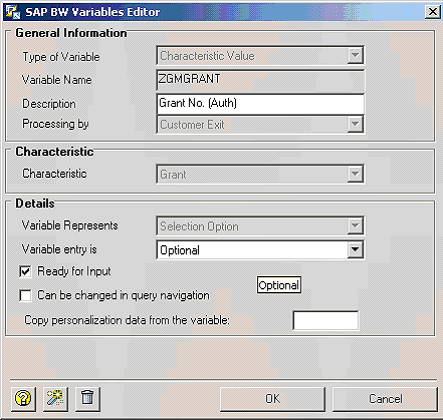
In-order to implement the SAP BW user exit RSR00001 you first need to create an authorisation object which references a $Variable. In this example I am using $ZGMGRANT, which has been linked to the users authorisation profile via transaction PFCG.

Now Within the BW query you have created via Bex Analyser you need to create and authorisation field with the processing type of 'customer exit'.


The next step is to activate the customer exit 'EXIT_SAPLRRS0_001'. To do this create a project in the CMOD transaction, select the SAP enhancement RSR00001 and assign it to the enhancement project. Activate the project.

The enhancement RSR00001 (BW: Enhancements for Global Variables in Reporting) is called up several times during execution of the report. Here, the parameter I_STEP specifies when the enhancement is called.

I_STEP = 1
Call takes place directly before variable entry. Can be used to pre populate selection variables

I_STEP = 2
Call takes place directly after variable entry. This step is only started up when the same variable is not input ready and could not be filled at I_STEP=1.

I_STEP = 3 In this call, you can check the values of the variables. Triggering an exception (RAISE) causes the variable screen to appear once more. Afterwards, I_STEP=2 is also called again.

I_STEP = 0
The enhancement is not called from the variable screen. The call can come from the authorization check or from the Monitor. This is where you want to put the mod for populating the authorization object. code for this is as follows:

case i_vnam.
  WHEN 'ZGMGRANT'.  "Query field name
    if i_step = 0.
      BREAK-POINT.
      clear wa_ETRANGE.

*     Gets all grants a user is able to see from ZTable,
*     which is populated elsewhere  
      select grant_nbr
        from ZGMUSERGRANTS
        into corresponding fields of table it_ZGMUSERGRANTS
       where UNAME eq sy-uname.

*     Populate Authorisation Object. In i_step 0
*     E_T_RANGE is used to populate the authorisation object
      loop at it_ZGMUSERGRANTS into wa_ZGMUSERGRANTS.
        wa_ETRANGE-sign = 'I'.
        wa_ETRANGE-opt = 'EQ'.
        CALL FUNCTION 'CONVERSION_EXIT_ALPHA_INPUT'
          EXPORTING
            INPUT         = wa_ZGMUSERGRANTS-grant_nbr
         IMPORTING
           OUTPUT        = wa_ZGMUSERGRANTS-grant_nbr.
        wa_ETRANGE-low  = wa_ZGMUSERGRANTS-grant_nbr.
        append wa_ETRANGE to E_T_RANGE.
      endloop.
    endif.
  ENDCASE.


Friday, September 3, 2010

SAP BI Process Chains


A process Chain is a sequence of processes in BI system that executes in the Background.
Commonly Used Process Types
1.  Start
2.  Execute InfoPackage
3.  DTP
4.  Attribute Change Run
5.  Save Hierarchy
6.  Delete Index
7.  Generate Index
8.  Activate DSO data
9.  Update DSO data
10. Complete Deletion of Data Target Content
11. Delete Entire Content of Linked Transactional DSO/ODS
12. Initial Fill of New Aggregates
13. Roll up of Filled Aggregates/BIA indexes
14. Compression of InfoCubes
15. Read PSA and Update Data Target
16. AND
17. OR
18. XOR

SAP V1, V2 and V3 Udates


Document update is where the transaction (documents) are updated in the application tables. This update is normally a synchronous update, i.e. if the update does not go through for whaterever reason, the complete transaction is rolled back.
Statistical update is the update of statistics for the transaction – like LIS or extractors for BW.
V1 – synchronous update. If the update is set to V1, then all tables are update and if any one fails, all are rolled back. Done for all transaction plus critical statistics like credit management, etc.
V2 – asynchronous update – transactions are updated and statistical updates are done when the processesor has free resources. If the statistical update fails, the transaction would have still gone through and these failures have to be addressed separately.
V3 – batch update – statistics are updated using a batch (periodic) job like every hour or end of the day. Failure behaviour is same as V2 updates.
Statistical update is also used as to describe the initial setup of the statistical tables for LO/LIS. When old transactions are updated in LO/LIS as a one time exercise, then it is called a statistical update also. Once these tables are upto date will all transactions, then every transaction is updated in them using V1, V2 or V3.

SAP BI-IP Implementation steps


With the release of SAP BI 7.0; SAP is recommending it’s user to use Intergrated Planning for their company wide Budgeting and Planning Application.
Integrated Planning – is a J2EE-web based Planning tool used to create Enterprise Planning Application.  The concept of planning remains the same for BPS and IP but IP gives a lot of flexibility to the developer to intergrate individual planning to create a consolidated web-based planning application.
Steps to create Planning Application  using BI-IP
1.  Create Real-Time InfoCube/MultiProvider that will be used to store plan data.  Developer can use a single InfoCube to store Plan & Actual data using an InfoObject “Value Type for Reporting” which will help user differentiate Plan and Actual data.  The 2nd choice could be use a MultiProvider that is created based on Two InfoCube: Plan & Actual.
Note: if you use a single InfoCube cube, make sure to change the Real-Time Load Behaviour when using it for Plan or Loading data.
2.  Goto Planning Modeler and select the above created Real-Time InfoProvider for creating Plannning Application based on this InfoProvider.
3.  Create Aggregation Level:   You can think of Aggregation Level as an User Level Planning: for example CFO, Regional Manager, Supervisor, etc.  individual Aggregation Level will have to be created respective user depending on respective user requirement.
4.  Create Filter:  This is the same concept as of Filters used in BEx Query Designer.  It will limit the scope of planning to the specific range of dataset.
5.  Planning Function:   SAP gives pre-defined planning functions that can be executed automatically using Front-End of planning Application
6.  Planning Sequence:   Here you can add the above created Planning Function to be executed sequentially in proper order.  Also,  developer can create an Input Enabled Query to enter the plan data manually in order to test his planning Application.